MrPaloma YouTube Studio is a browser-based online workspace that lets you start from the captions of a YouTube video to obtain an editable transcript, an Italian summary, an English translation, and a concept cover generated with artificial intelligence. The central theme concerns the thoughtful reuse of content: recovering a video's words, identifying the key information, and transforming them into useful materials for studying, taking notes, or preparing new editorial projects.
The tool combines four linked functions and can be launched either from a link to a YouTube video or from an already available transcript. The quality and usefulness of the result depend on the source content and the user's review.
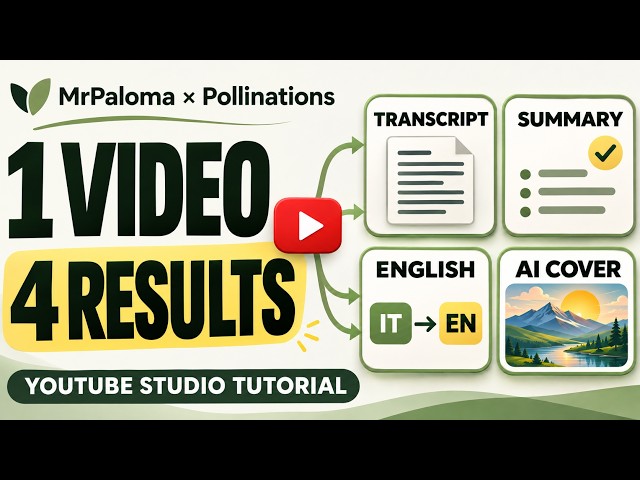
MrPaloma YouTube Studio is a browser-based tool that combines four linked functions: caption recovery, text summarization, translation, and image creation. The starting point can be a link to a YouTube video or an already available transcript. This makes the tool usable even when the user has already prepared the text and wants to move directly to subsequent processing.
The interface features an initial field for the link and four panels dedicated to the results. The transcript remains the reference material, while the other sections allow you to obtain summarized, translated, or visual versions of the content. The tool is available with an Italian and English interface.
The tool may interest students, professionals, content creators, and people who use YouTube to stay informed or learn. A student can recover the text of an explanation and use it as a basis for their own notes. Someone following a tutorial can identify the key steps and save them in a document. An author can use the summary to organize an outline, then verify the information in the original video.
For those working with content in multiple languages, the English translation provides an additional starting point for adapting the material to a different audience. These are possible uses of the tool: the quality and usefulness of the result depend on the source content and the user's review.
To get started, the user pastes a video link into the dedicated field and selects the extraction button. Various link formats are supported, including standard video URLs, shortened youtu.be links, and Shorts links. Actual text availability, however, depends on the ability to recover the captions.
This distinction is important: the tool recovers existing and accessible captions. It does not listen to the audio to create a new transcript when the video is without them. A public video, therefore, does not automatically guarantee a successful extraction. Captions might be missing or inaccessible to the service. Caption recovery can be used without connecting a Pollinations account.
When extraction succeeds, the text appears in the original transcript panel. The user can read and edit it before running the AI functions. This step helps correct proper names, specialized terms, punctuation, or words misinterpreted by automatic captions. A more accurate source promotes better results in subsequent processing of summarization, translation and image generation..
The tool combines four linked functions and can be launched either from a link to a YouTube video or from an already available transcript. The quality and usefulness of the result depend on the source content and the user's review.
Contents
- What is MrPaloma YouTube Studio
- Who can benefit from the tool
- How YouTube caption recovery works
- The transcript can be reviewed and edited
What is MrPaloma YouTube Studio
MrPaloma YouTube Studio is a browser-based tool that combines four linked functions: caption recovery, text summarization, translation, and image creation. The starting point can be a link to a YouTube video or an already available transcript. This makes the tool usable even when the user has already prepared the text and wants to move directly to subsequent processing.
The interface features an initial field for the link and four panels dedicated to the results. The transcript remains the reference material, while the other sections allow you to obtain summarized, translated, or visual versions of the content. The tool is available with an Italian and English interface.
Who can benefit from the tool
The tool may interest students, professionals, content creators, and people who use YouTube to stay informed or learn. A student can recover the text of an explanation and use it as a basis for their own notes. Someone following a tutorial can identify the key steps and save them in a document. An author can use the summary to organize an outline, then verify the information in the original video.
For those working with content in multiple languages, the English translation provides an additional starting point for adapting the material to a different audience. These are possible uses of the tool: the quality and usefulness of the result depend on the source content and the user's review.
How YouTube caption recovery works
To get started, the user pastes a video link into the dedicated field and selects the extraction button. Various link formats are supported, including standard video URLs, shortened youtu.be links, and Shorts links. Actual text availability, however, depends on the ability to recover the captions.
This distinction is important: the tool recovers existing and accessible captions. It does not listen to the audio to create a new transcript when the video is without them. A public video, therefore, does not automatically guarantee a successful extraction. Captions might be missing or inaccessible to the service. Caption recovery can be used without connecting a Pollinations account.
The transcript can be reviewed and edited
When extraction succeeds, the text appears in the original transcript panel. The user can read and edit it before running the AI functions. This step helps correct proper names, specialized terms, punctuation, or words misinterpreted by automatic captions. A more accurate source promotes better results in subsequent processing of summarization, translation and image generation..
Salsomaggiore Terme (Tecnologia) - 08/11/2026 - From a YouTube video to new content with MrPaloma YouTube Studio and Pollinations AI
Written by Mokik
Written by Mokik
Referral links
Referral links do not influence our judgement or the content of the article. Our aim is to provide accurate, detailed and useful information for our readers.
Amazon Support MrPaloma by starting your Amazon shopping from this link amazon.it.
NordVpn Protect your browsing and support us: get NordVPN through our affiliate link! Nord Vpn
StarLinik Internet wherever you go StarLinik
Amazon Prime | Amazon Music Unlimited | Prime Video | Amazon Business | Kindle Unlimited | Amazon Wedding List | Prime Student